System and ERP integration via API: how to connect them without a spreadsheet in the middle
Integrating systems via API means getting the ERP, the CRM, WhatsApp and your other tools to exchange data on their own, without someone exporting a spreadsheet on one side and importing it on the other. When integration is missing, the symptom is familiar: late data, different numbers on every screen and one person who knows how to put it all together. The technical decision starts before the code, with a map of what needs to talk to what. It applies to any company with more than one system.
What integrating means in practice
An API is the door through which one system offers data and functions to another. Integrating means using those doors so information is created once and moves on its own to where it needs to be: the order enters the CRM, goes to the ERP and shows up in the report without anyone retyping it.
There are two rhythms. In real time, a change in one system triggers the update in the other immediately, which suits inventory, scheduling and customer service. In batch, the exchange happens at set times, which is enough for reports and reconciliations. The choice depends on what delay costs the operation.
Start with the map, not the code
Before any connection, list the systems you have and answer four questions for each important piece of data (customer, product, price, inventory, order): which system is the source of truth, where the data needs to go, how often, and what happens when the exchange fails.
That map avoids the most expensive mistake, which is two systems believing they own the same data. It also shows which integrations pay off quickly and which can wait.
What usually gets integrated first
The core is the link between ERP, CRM and database, so that orders, customers, inventory and history stay in sync, with no double entry and no stale copy. Next come the service channels: connected to internal systems, WhatsApp reads and writes real data. That is how Marina, at Clínica Santamarina, confirms appointments directly in the clinic's schedule.
Then come external APIs, such as payment gateways, shipping calculation and data warehouses. When the integration a company needs does not exist on the market yet, it is built to order. The systems and API integration page describes what NexUnio delivers in this area.
When the system has no API
Not every system offers integration. In those cases the alternatives are usually scheduled file exchange, reading the database directly when that is allowed and safe, or migrating to a base that integrates better. Each has a different cost and risk, and the choice should come from the map, not from haste.
In the case of Xica, the management system (C7) had no API. The way out was migrating to a base with rich integration, including catalog, inventory and POS, without stopping operations. Migrating is not always necessary, but it is the answer when the current system limits everything that comes next.
Mistakes that leave data duplicated or late
Four failures appear often: two sources of truth for the same data, fields that mean different things in each system, no error handling or reprocessing when an exchange fails, and no monitoring, so nobody notices when the integration stops.
Prevention lies in the design: one owner for each piece of data, a single identifier shared across systems, a log of every exchange and an alert when something does not arrive. An integration nobody monitors turns back into a spreadsheet, only hidden.
How to start
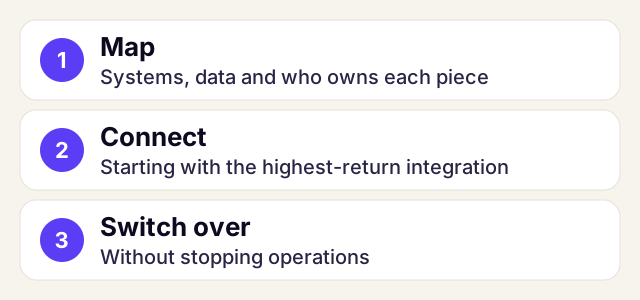
The path has three steps: map the systems and the data, connect starting with the highest-return integration, and switch over without stopping operations. Short deliveries show value early and let you correct course.
To decide whether to build or buy, see off-the-shelf system or custom software and how to choose a software house. To assess your case, book a 30-minute conversation.
Frequently asked questions
What is system integration via API?
It is getting systems such as ERP, CRM and WhatsApp to exchange data automatically through the APIs each one offers, instead of exporting and importing spreadsheets by hand.
Real-time or batch integration?
Real time for what cannot wait, such as inventory, scheduling and customer service. Batch for reports and reconciliations. The choice depends on what delay costs the operation.
What if my ERP has no API?
The options are usually scheduled file exchange, reading the database directly when allowed and safe, or migrating to a base that integrates better. The map of your systems shows which one pays off.
How do I avoid duplicated data between systems?
By defining one owner for each piece of data, a single identifier across systems, a log of every exchange and an alert when an exchange fails.
Where should an integration start?
With the map of systems and data, and with the highest-return integration. Short deliveries show value early and let you correct course.

16 years building custom software; leads NexUnio's AI engineering. Learn about NexUnio · LinkedIn